
Slack and Discord Alerts
Get your team's most important Postigniter alerts in the Slack or Discord channel you already use.
Only owners and admins can connect channels.
Get a webhook URL
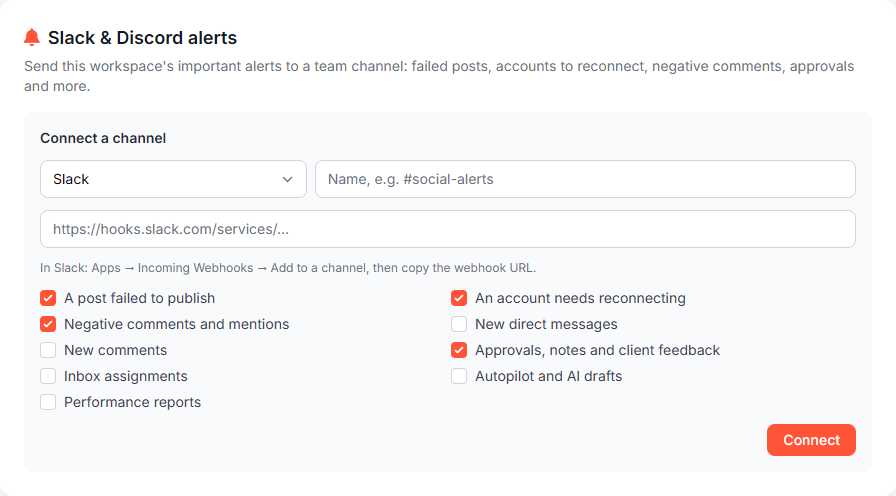
Slack: Apps → Incoming Webhooks → Add to a channel, then copy the webhook URL. It starts with https://hooks.slack.com/services/.
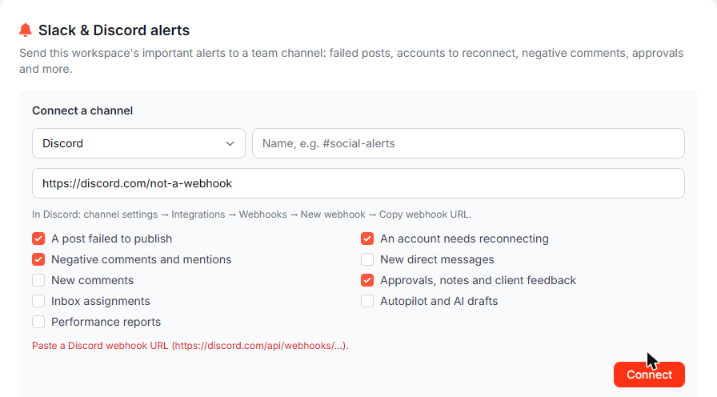
Discord: Channel settings → Integrations → Webhooks → New webhook → Copy webhook URL. It starts with https://discord.com/api/webhooks/.
Connect a channel
- Go to Settings in the sidebar and find Slack & Discord alerts.
- Choose Slack or Discord.
- Give it a name, e.g.
#social-alerts. - Paste the webhook URL.
- Tick the alerts you want.
- Click Connect, then Send test to check it works.
Alerts you can choose
- A post failed to publish
- An account needs reconnecting
- Negative comments and mentions
- New direct messages
- New comments
- Approvals, notes and client feedback
- Inbox assignments
- Autopilot and AI drafts
- Performance reports
Each alert is sent to the channel once, even if several people on your team are notified.
Only real Slack and Discord addresses
For security, Postigniter only accepts official Slack and Discord webhook addresses over https. Anything else is refused with a message telling you which format to use.
Manage channels
- Edit: change the name or alerts. Leave the URL empty to keep the current one.
- Remove: disconnect the channel.
- You can connect up to 5 channels per workspace.
- Webhook URLs are stored encrypted and shown masked.
- If a channel fails 5 times in a row (for example, the webhook was deleted in Slack), it turns itself off and shows the last error. Fix the URL and save to turn it back on.
The AI chat knows where your alerts go, but for security it can't connect channels for you. Webhook addresses never go through the chat.