
Image Alt Text
Alt text is a short description of an image for people who use screen readers. It also helps platforms understand your content.
Add alt text in the post creator
- On the Media step, add your images.
- Open the Alt text panel under the thumbnails. It shows how many images have a description, e.g. (0/2).
- For each image, either:
- type a description in the box, or
- click AI to have AI describe the image.
- Your text is saved as you go.
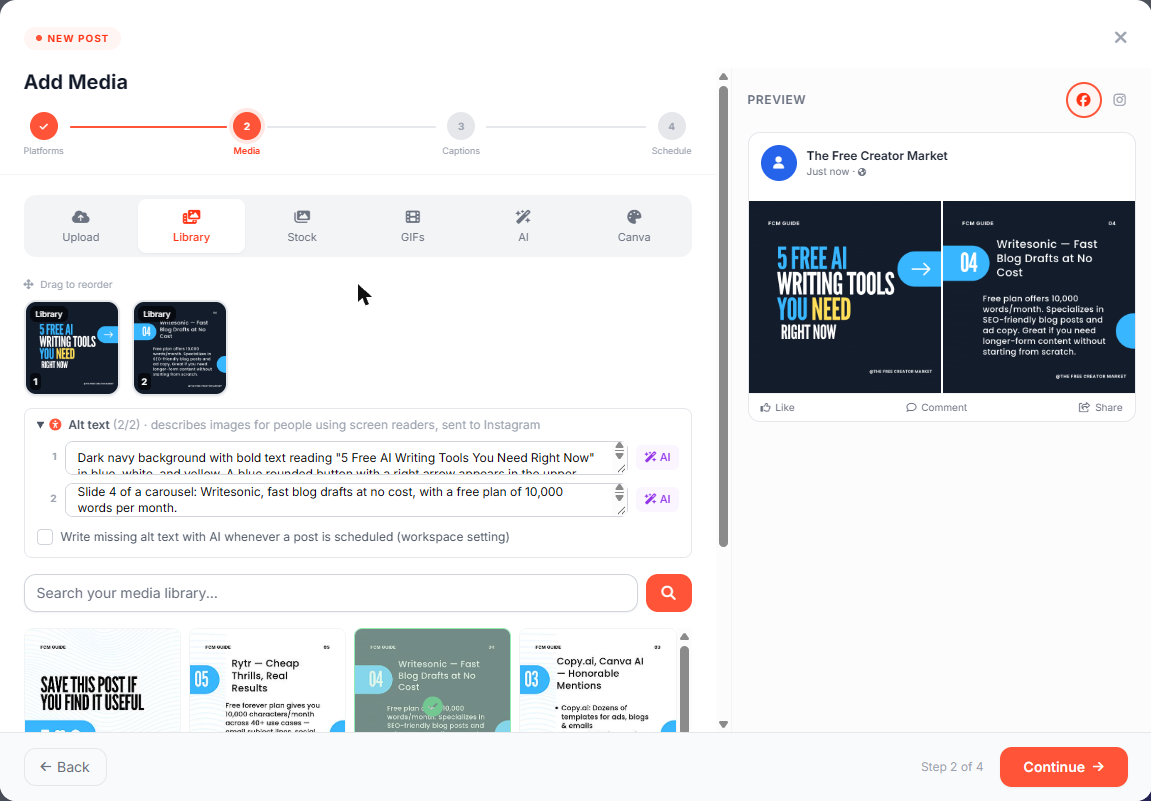
Alt text belongs to the image itself, so it follows the image wherever you reuse it. AI never overwrites a description that a person wrote.
Tips
- Describe what matters in the image, including any text on it.
- Don't start with "Image of…" and don't add hashtags.
Where alt text is sent
| Platform | Alt text sent? | |---|---| | Instagram (single images and carousels) | Yes | | Facebook | Not yet | | LinkedIn | Not yet |
If Instagram ever rejects a post because of its alt text, Postigniter posts it again without the alt text, so your post always goes out.
Write missing alt text automatically (Pro)
Owners and admins can tick Write missing alt text with AI whenever a post is scheduled (workspace setting). Every scheduled post then gets AI alt text for any image that doesn't have one, including posts from the AI chat, Autopilot, the API and CSV imports.
- It's off by default because it uses AI credits on every post.
- It's a Pro feature. On other plans you'll see a Pro badge and an Upgrade to Pro link instead of the checkbox.
- If you use Publish Now, the post may go out before the AI has finished. Only alt text written beforehand is sent.
Ask the AI chat
- "Write alt text for post 123" (fills in any missing descriptions)
- "Set the alt text for image 2 of post 123 to: A barista pouring latte art"