
Notes on Posts
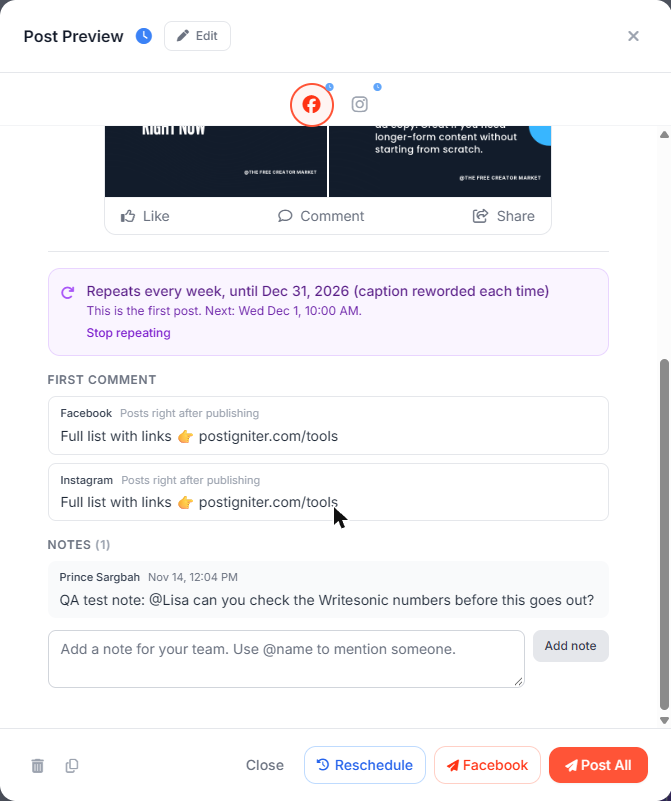
Every post has a notes thread where your team can leave comments, ask questions and record decisions. Notes are internal. They are never published.
Add a note
- Open a post from the calendar, the Drafts list or Search.
- Scroll to Notes at the bottom of the post preview.
- Type your note and click Add note.
Mention someone
Type @ followed by their first name, for example @Lisa. If two people share a first name, use @Firstname.Lastname.
The person you mention gets an in-app notification ("Prince mentioned you on a post") with a link straight to the post. The post's author is also notified when someone else leaves a note.
What else appears in the thread
The thread also records the review history:
- Submitted when a member sends a post for approval
- Approved and Changes requested (with the reviewer's reason)
- Client and Client approved notes from client review links
Notes and the AI
Change requests from reviewers are shared with the AI chat, Idea Lab and Autopilot as your team's standards, so future AI drafts follow them.
You can also ask the AI chat: "Add a note to post 123: please double-check the hashtags".
Activity log
Every note is recorded in the Activity log.