
First Comment (Facebook & Instagram)
A first comment is posted under your post right after it goes live. It's a good place for links (Instagram captions can't have clickable links), extra hashtags or a question to start the conversation.
First comments work on Facebook and Instagram feed posts. They aren't available for Stories or other platforms.
Add a first comment
- Create or edit a post that includes Facebook or Instagram.
- On the Captions step, find the First comment card under the caption.
- Type your comment (up to 2,200 characters).
The same first comment is used for Facebook and Instagram.
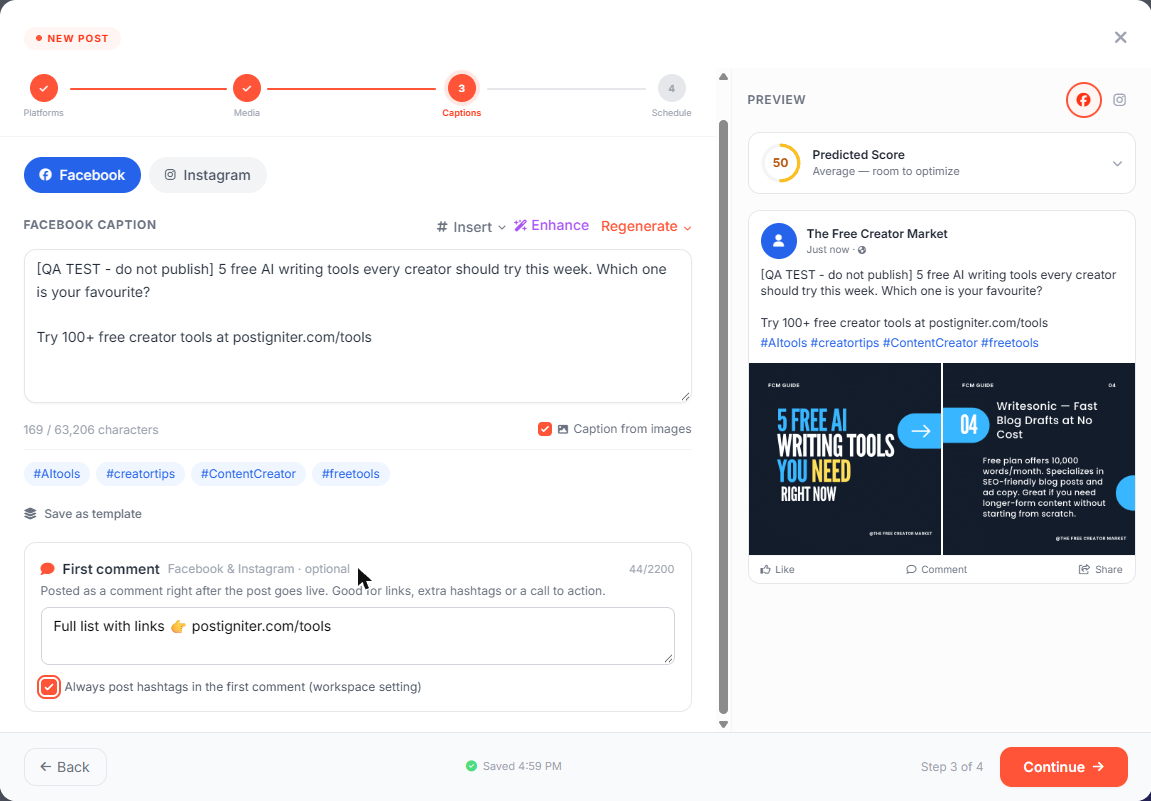
Put hashtags in the first comment
Tick Always post hashtags in the first comment (workspace setting) to move the hashtags out of the caption and into the first comment on every Facebook and Instagram post.
- This is a workspace setting. It applies to all posts, including ones from the AI chat, Autopilot, the API and CSV imports.
- The move happens when the post is published, so the preview in the creator still shows the hashtags under the caption.
- Only owners and admins can change it.
After publishing
The post preview shows the first comment for each platform and its status. If it couldn't be posted (for example, the account needs reconnecting to allow comments), you'll see the reason and a Retry button. A failed first comment never stops the post itself from being published.
Your own first comments are recognised in the Inbox, so they aren't counted as new comments and the AI never replies to them.
Ask the AI chat
- "Add a first comment to post 123: Full guide at example.com/guide"
- "Always put hashtags in the first comment"