
Saved Replies (Inbox)
Saved replies are approved answers to questions you get often, like "Where can I find your tools?" or "Do you ship abroad?". Insert one with a click instead of typing it again.
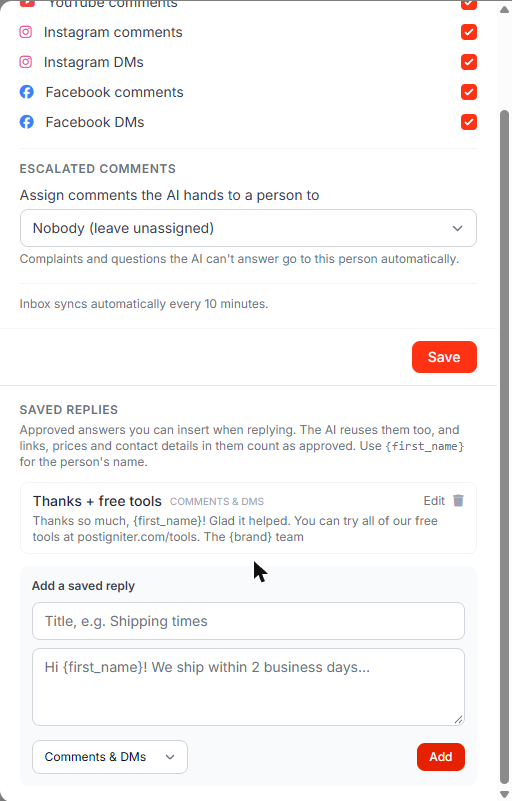
Add a saved reply
- Open the Inbox and click Settings.
- Scroll to Saved replies.
- Enter a title (e.g. "Thanks + free tools") and the reply text.
- Choose where it can be used: Comments & DMs, Comments only or DMs only.
- Click Add.
Placeholders
| Placeholder | Becomes | |---|---| | {first_name} | The person's first name, or their username on Instagram | | {name} | The person's full name | | {brand} | Your workspace name |
If the name isn't available (Facebook sometimes hides it), {first_name} becomes "there", so "Hi {first_name}!" reads "Hi there!".
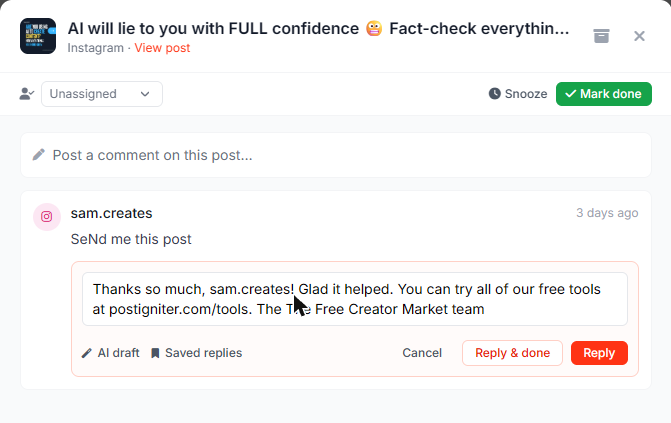
{brand}is your full workspace name. If your workspace name starts with "The", write "{brand} team" rather than "The {brand} team".
Use a saved reply
- Open a conversation and click Reply to this (or start a DM reply).
- Click Saved replies under the reply box and pick one.
- The text is inserted with the placeholders filled in. Edit it if you like, then send.
Who can manage them
Owners, admins and members can add saved replies and use them. Viewers can't manage them. You can edit or delete your own saved replies; owners and admins can edit or delete any.
Saved replies and the AI
Saved replies are your approved answers. The AI uses them in:
- AI reply drafts in the inbox
- Autopilot's comment reply suggestions
- the AI chat
Links, email addresses, phone numbers and prices are normally blocked from AI replies. They're allowed when they appear in your saved replies or brand facts.
Ask the AI chat: "Save a reply called Shipping: We ship worldwide within 5 days".