Instagram Caption Generator from Video: Best Workflow for Reels, Clips, and Repurposed Content
Postigniter Team
June 23, 2026
Why a Caption Generator from Video Is a Game-Changer for Creators
If you create video content regularly, you already know the struggle: you film a great Reel, nail the delivery, and then spend 20 minutes staring at a blank caption box. A caption generator from video solves this problem by turning your spoken words and video context into ready-to-post Instagram captions in seconds. As Instagram continues to expand its AI and editing features around short-form video, this workflow is quickly becoming essential for serious creators.
Furthermore, the rise of Reels has changed how audiences discover content. Instagram reports that Reels now drive more reach than any other format on the platform. Yet many creators still treat captions as an afterthought. Consequently, they miss out on keyword discoverability, engagement, and the SEO value that strong captions provide.
This guide walks you through the best workflow for generating captions from video content — whether you are working with original Reels, repurposed clips, or cross-platform content. Additionally, you will learn how to use AI tools to speed up every step of the process.

Understanding the Video-to-Caption Workflow
Before diving into tools, it helps to understand what the workflow actually looks like. At its core, a video-to-caption process involves three stages: transcription, summarization, and optimization. Each stage transforms raw video content into a polished, platform-ready caption.
Stage 1: Transcription
First, the spoken audio in your video is converted to text. Tools like OpenAI's Whisper and other speech-to-text engines handle this step automatically. However, raw transcripts are rarely caption-ready — they often include filler words, incomplete sentences, and poor formatting.
Stage 2: Summarization and Rewriting
Next, an AI layer takes the transcript and distills it into a compelling caption. This step involves identifying the core message, adding a hook, and matching the tone of your brand. Moreover, good AI tools will suggest relevant hashtags and calls to action at this stage.
Stage 3: Optimization for Instagram
Finally, the caption is refined for Instagram's algorithm and audience behavior. This means front-loading the hook, keeping the first line punchy, and including keywords that boost discoverability. Ultimately, this three-stage process is what separates a generic caption from one that actually drives engagement.
Best Tools for Using a Caption Generator from Video
Not all caption tools are built the same. Some focus purely on text input, while others are designed to process video or audio directly. Here is a breakdown of the most effective options available to creators today.
1. AI Caption Generators with Video Input
These tools accept a video file or URL and produce a caption automatically. They combine transcription and AI writing in one step. Postigniter's suite of free AI content tools is built for exactly this kind of creator workflow. You can explore the full toolkit at Postigniter Tools — it includes options for captions, hooks, and repurposed content.
2. Transcript-Based Caption Generators
If you already have a transcript, tools like Postigniter's Keyword Caption Generator let you paste your text and generate optimized captions around specific keywords. This is ideal for creators who use editing software that exports transcripts automatically. Furthermore, it gives you more control over which parts of the video to highlight.
3. Image and Context-Based Generators
For Reels where the visual content tells the story, a tool like the Image Caption Generator can analyze your thumbnail or key frame and produce a relevant caption. Additionally, this approach works well for lifestyle and product content where the visual is the main message.
4. Hook Generators for Video Intros
Strong Reels start with a strong hook — both on screen and in the caption. The Post Hook Generator helps you craft opening lines that stop the scroll. Notably, pairing a video hook with a matching caption hook creates a consistent experience that keeps viewers engaged longer.
Step-by-Step Workflow: From Raw Video to Published Caption
Now that you understand the tools, here is a practical, repeatable workflow you can use for every video you produce. This process works for original Reels, repurposed YouTube clips, TikToks, and any other short-form video format.
- Record or source your video. This can be an original Reel, a clip from a longer video, or a repurposed piece of content from another platform.
- Extract the transcript. Use your editing software, a dedicated transcription tool, or an AI service to get the spoken words in text form.
- Identify the core message. Read through the transcript and highlight the single most important idea. This becomes the foundation of your caption.
- Run it through a caption generator. Paste the transcript or key message into your chosen AI tool and generate multiple caption options.
- Optimize for Instagram. Edit the output to ensure the first line is a hook, keywords are included naturally, and the tone matches your brand.
- Add hashtags and a CTA. Use relevant hashtags and a clear call to action to maximize reach and engagement.
- Schedule and post. Use a social media scheduling tool to post at the optimal time for your audience.
For best results, check the best time to post on Instagram before scheduling. Posting at the right moment can significantly boost your initial engagement rate, which signals to the algorithm to push your Reel further.
How to Repurpose Video Content Into Instagram Captions
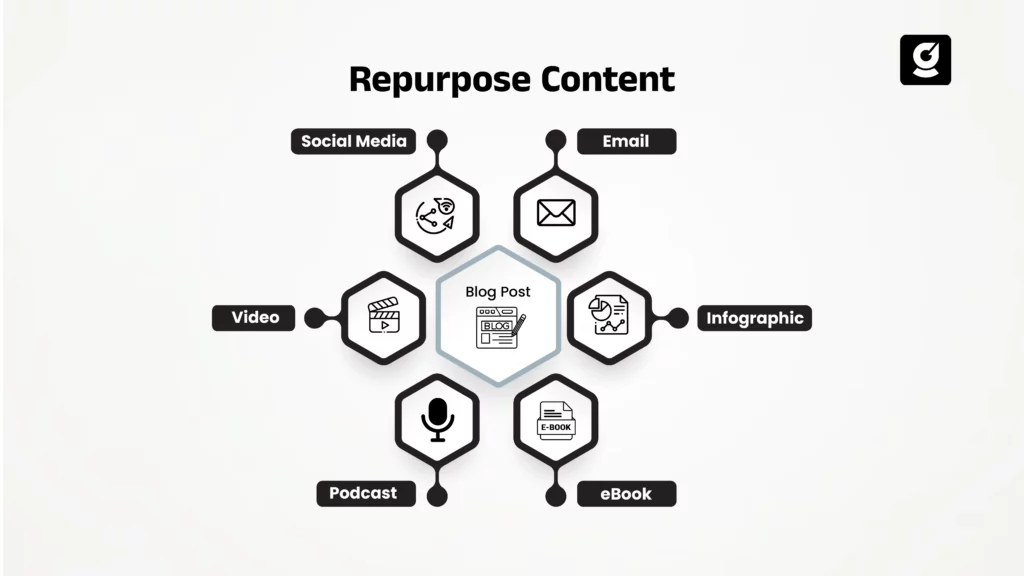
Repurposing is one of the smartest strategies in a creator's toolkit. Instead of creating new content from scratch every day, you extract value from content you have already made. A caption generator from video makes this process dramatically faster and more consistent.
Repurposing YouTube Videos as Instagram Reels
Long-form YouTube videos are gold mines for short-form content. Specifically, a single 10-minute video can yield five to ten Reels, each with a unique caption. Start by pulling the transcript of your YouTube video, then identify the strongest moments or insights. Run each one through a caption generator to create platform-specific copy for Instagram.
Repurposing TikToks for Instagram
TikTok and Instagram audiences have different expectations. However, the core content can often be reused with a fresh caption. Use a caption generator to rewrite the TikTok's message in a tone that resonates with Instagram's more polished, lifestyle-oriented culture. Moreover, removing the TikTok watermark and adjusting the caption ensures the content feels native to Instagram.
Repurposing Podcast or Interview Audio
Audio-first content like podcasts can be turned into powerful Reels with audiogram-style visuals. Additionally, the spoken insights from an interview are perfect raw material for caption generators. Simply transcribe the most quotable moments and let the AI transform them into engaging Instagram captions with hooks and hashtags included.
For a streamlined repurposing experience, try Postigniter's Content Repurposer tool — it is designed to help creators adapt content across platforms without starting from zero every time. Get started today and see how much time you can save.
Tips for Writing Better Captions from Video Content
Even the best AI tool benefits from a human touch. Here are proven tips for getting the most out of any caption generator from video workflow.
- Lead with emotion or curiosity. The first line of your caption determines whether someone taps "more." Make it irresistible.
- Mirror your video's energy. If your Reel is high-energy and fast-paced, your caption should match that tone. Consistency builds trust.
- Use line breaks strategically. Short paragraphs and line breaks make captions easier to read on mobile screens.
- Include a question. Asking a question in your caption is one of the simplest ways to drive comments and boost engagement.
- Limit hashtags to 3-5 highly relevant ones. Instagram's own creator guidance suggests fewer, more targeted hashtags over large clusters.
- Always include a CTA. Whether it is "save this," "share with a friend," or "link in bio," a call to action gives your audience a next step.
- Test multiple caption variations using a tool like the Caption Ranker to see which version is likely to perform best before you post.
Measuring the Impact of Your Video Captions
Generating great captions is only half the battle. You also need to track how they perform and refine your approach over time. Fortunately, there are clear metrics to watch.
Engagement Rate
Engagement rate — likes, comments, shares, and saves divided by reach — is the most telling metric for caption quality. A strong caption encourages saves and shares, which carry more algorithmic weight than likes alone. Use Postigniter's Engagement Rate Calculator to benchmark your performance and identify which caption styles resonate most with your audience.
Reach and Impressions
Captions that include strategic keywords can appear in Instagram's search results, driving organic reach beyond your existing followers. Therefore, tracking reach over time shows whether your keyword strategy is working. If reach is growing, your captions are doing their job.
Saves and Shares
Saves indicate that your content is genuinely useful or inspiring. Specifically, captions that include actionable tips, lists, or strong CTAs tend to generate more saves. Moreover, shares extend your reach to new audiences who might not follow you yet.
Common Mistakes to Avoid When Using a Caption Generator from Video
AI tools are powerful, but they work best when used thoughtfully. Here are the most common mistakes creators make — and how to avoid them.
- Posting AI output without editing. Always review and personalize generated captions. Your audience follows you, not a generic AI voice.
- Ignoring the first line. The hook is everything on Instagram. If the AI gives you a weak opener, rewrite it before posting.
- Using irrelevant hashtags. More hashtags do not mean more reach. Focus on tags that are directly relevant to your content and audience.
- Skipping the CTA. Every caption should tell the viewer what to do next. Never leave them without a clear next step.
- Not A/B testing. Try different caption styles for similar videos and track which performs better. Over time, you will build a clear picture of what works for your audience.
The Future of Caption Generation from Video
The technology behind video-to-caption generation is evolving fast. AI models are getting better at understanding context, tone, and even visual content within videos. As a result, future tools will likely generate captions that reflect not just what was said, but how it was said and what was shown on screen.
Furthermore, as Instagram continues to integrate AI into its native editing suite, creators who already have a video-to-caption workflow in place will have a significant head start. TechCrunch reports that Instagram is actively testing AI-generated caption features natively within the app — a clear signal that this workflow is only going to become more central to content creation.
Ultimately, the creators who thrive will be those who combine smart AI tools with a strong understanding of their audience. A caption generator from video is not a replacement for creativity — it is a force multiplier that lets you create more, faster, without sacrificing quality.
Conclusion: Build Your Video-to-Caption Workflow Today
Turning video content into compelling Instagram captions no longer has to be a slow, manual process. With the right workflow and the right tools, you can go from raw footage to a polished, optimized caption in minutes. Whether you are creating original Reels, repurposing long-form content, or adapting clips from other platforms, a caption generator from video is the missing piece in your content strategy.
Additionally, pairing your captions with smart scheduling ensures your content reaches the right people at the right time. Discover how Postigniter can transform your entire social media workflow — from caption generation to scheduling and analytics — all in one free platform. Visit Postigniter today and join over 12,000 creators who are already working smarter.
Tags
Postigniter Team
The Postigniter team shares practical tips and strategies to help creators grow their online presence.